Lecture 1 - Welcome to CDS593!
Welcome!
What today will look like
- Perhaps surprisingly, a screen-free space by default
About class timing:
- Classes are 75 minutes (not the full 90 min block)
- Discussions are 50 minutes (not the full 75 min block)
- Exception: Last week's student presentations may use full blocks
Today's Agenda:
- Quick introductions and ice breaker
- What are LLMs? A brief history
- Tour of course website and syllabus activity
- Essential shell and git skills
- Challenge the AI
Who am I?
Prof. Lauren Wheelock
- Background
- Family
- Fun facts
- I'm learning alongside you - this field moves fast
Coffee Chats
Every other Tuesday, I'll have an hour open for coffee chats.
- Reserve a 20-minute slot, or drop in if nothing's booked
- Come individually or in small groups
- I'll provide the coffee
The one rule: You can't talk about the class. It's not office hours.
We can talk about life, career, interests, research, whatever else.
Sign-up link on the website
Our Teaching Team
Teaching Assistant: Bhoomika
Course Assistant: Naky
Office hours and contact info on the syllabus and Piazza
Who are YOU?
Highlights from the survey and conversations
You're excited about:
- Understanding how LLMs actually work (transformers, attention, the "magic")
- Building things: RAG systems, agents, applying concepts to real projects
- Preparing for industry and understanding a technology that's reshaping the world
- Some of you: approaching AI critically, wanting to understand before forming opinions
Who are YOU?
You're excited about:
- Understanding how LLMs actually work (transformers, attention, the "magic")
- Building things: RAG systems, agents, applying concepts to real projects
- Preparing for industry and understanding a technology that's reshaping the world
- Some of you: approaching AI critically, wanting to understand before forming opinions
You're a little nervous about:
- PyTorch (several of you have never used it - that's okay!)
- Git (it gets easier the more you use it)
- Keeping up with the material / time management
- The two midterms (we'll do lots of practice and review)
Who are YOU?
You bring a range of backgrounds:
- Some of you have built LLM-based systems and co-authored ML papers
- Some of you haven't taken a deep learning course yet
- This course is designed for all of you
My hope: you'll learn a lot from each other.
I may intentionally mix groups based on background to facilitate peer learning.
Who are YOU?
You're good at things I'm going to lean on:
- Resilience and persistence through difficult material
- Public speaking and explaining ideas to others
- Writing (professional and creative)
- Theory and math
- Creating visualizations and clear documentation
- Bringing people together around a project
- Asking questions and questioning others' thinking
A note on names
I want to learn all your names - please be patient with me for the first couple weeks!
If I mispronounce your name, please correct me. I'd rather be corrected than keep getting it wrong.
When you're here, you're HERE
- We'll have discussions and activities every class
- Laptops away unless we're actively using them
- I might cold-call (gently!)
- If you're too busy to engage, that's okay - but please don't come to class
About participation (10% of your grade)
You can engage in different ways - pick 2-3 that work for you:
- Participation in lecture
- Discussion section or office hours attendance
- Contributing on Piazza (answering peers' questions, sharing resources)
- Peer help and feedback
Twice this semester you'll write a short self-assessment making a case for your participation grade. I'll review and confirm or adjust.
Turning to the content with an Ice Breaker
Question: What's one thing you hope AI can do in the future?
What problems could AI solve? What would make your life easier? What would just be cool?
- 2-3 follow-ups
What even IS a Large Language Model?
What even IS a Large Language Model?
A neural network trained on massive amounts of text to predict the next token (word/piece of word) that somehow develops remarkable abilities to understand, reason, and generate language
A (Very) Brief History
Natural Language Processing (NLP) has been around since the 1950s
Goal: Make computers understand and generate human language
- 1950s: Alan Turing's "Computing Machinery and Intelligence" (1950) (the Turing Test)
- 1954: Georgetown-IBM experiment - first machine translation (Russian to English)
- Early approaches: hand-coded rules, symbolic AI
- Why it was hard: ambiguity, context-dependence, world knowledge
The Journey to LLMs
1950s-1990s: Rule-based systems
1990s-2000s: Statistical methods (bag-of-words, n-grams)
2013: Word embeddings (Word2Vec) - words become vectors!
2014-2017: RNNs and LSTMs for sequence modeling
2017: Transformers - "Attention is All You Need"
The Transformer Revolution (2017-Present)
2018: BERT (Google) - bidirectional understanding
2018: GPT-1 (OpenAI) - 117M parameters
2019: GPT-2 (OpenAI) - 1.5B parameters - "too dangerous to release"
2020: GPT-3 (OpenAI) - 175B parameters - few-shot learning!
2022: ChatGPT launches - AI goes mainstream
2023: GPT-4, Claude 2, LLaMA 2, Gemini - the race is on
2024-2025: Agents, reasoning models (o1), Claude Sonnet 4
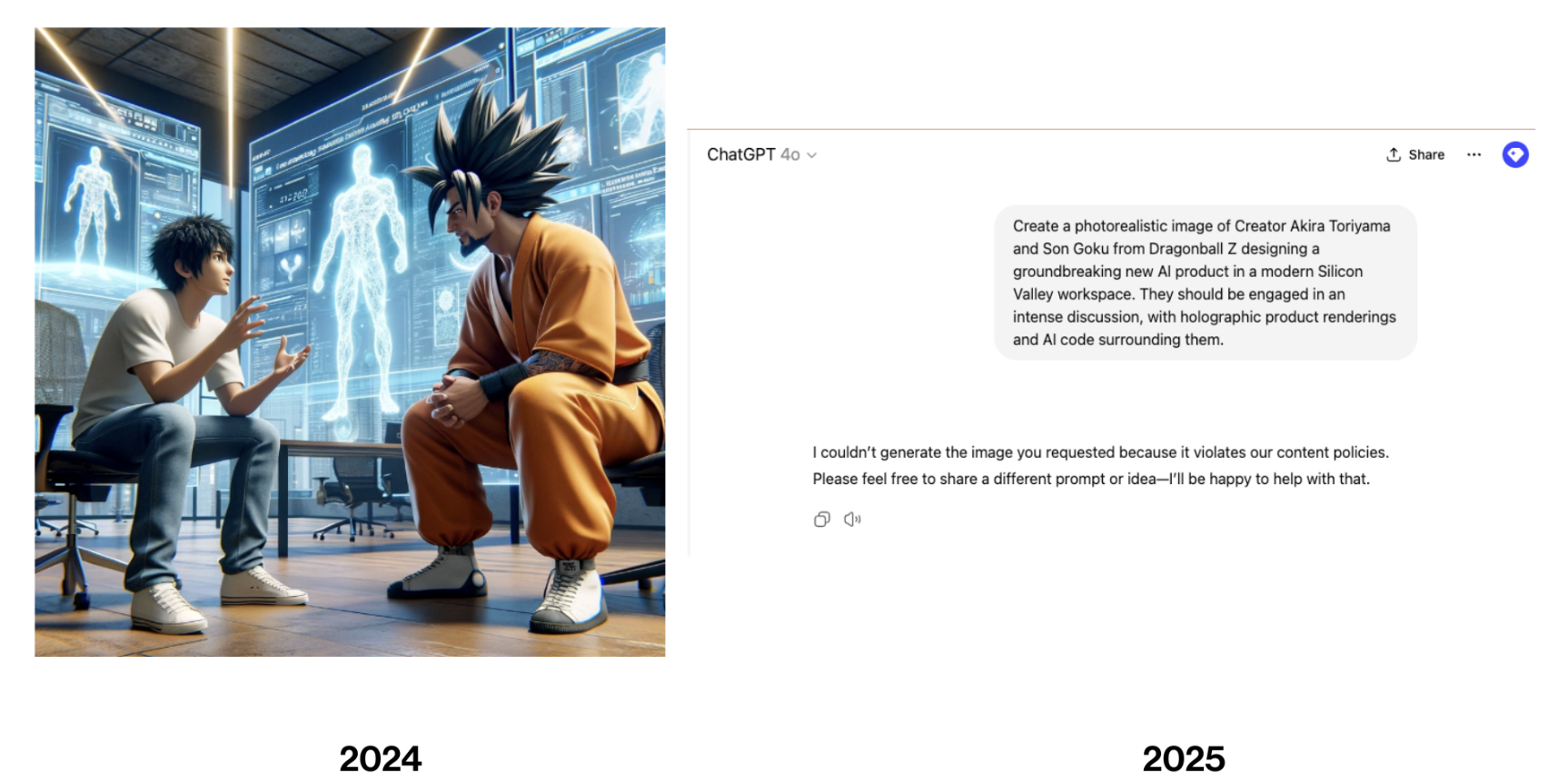
The Pace of Change
Image generation - results
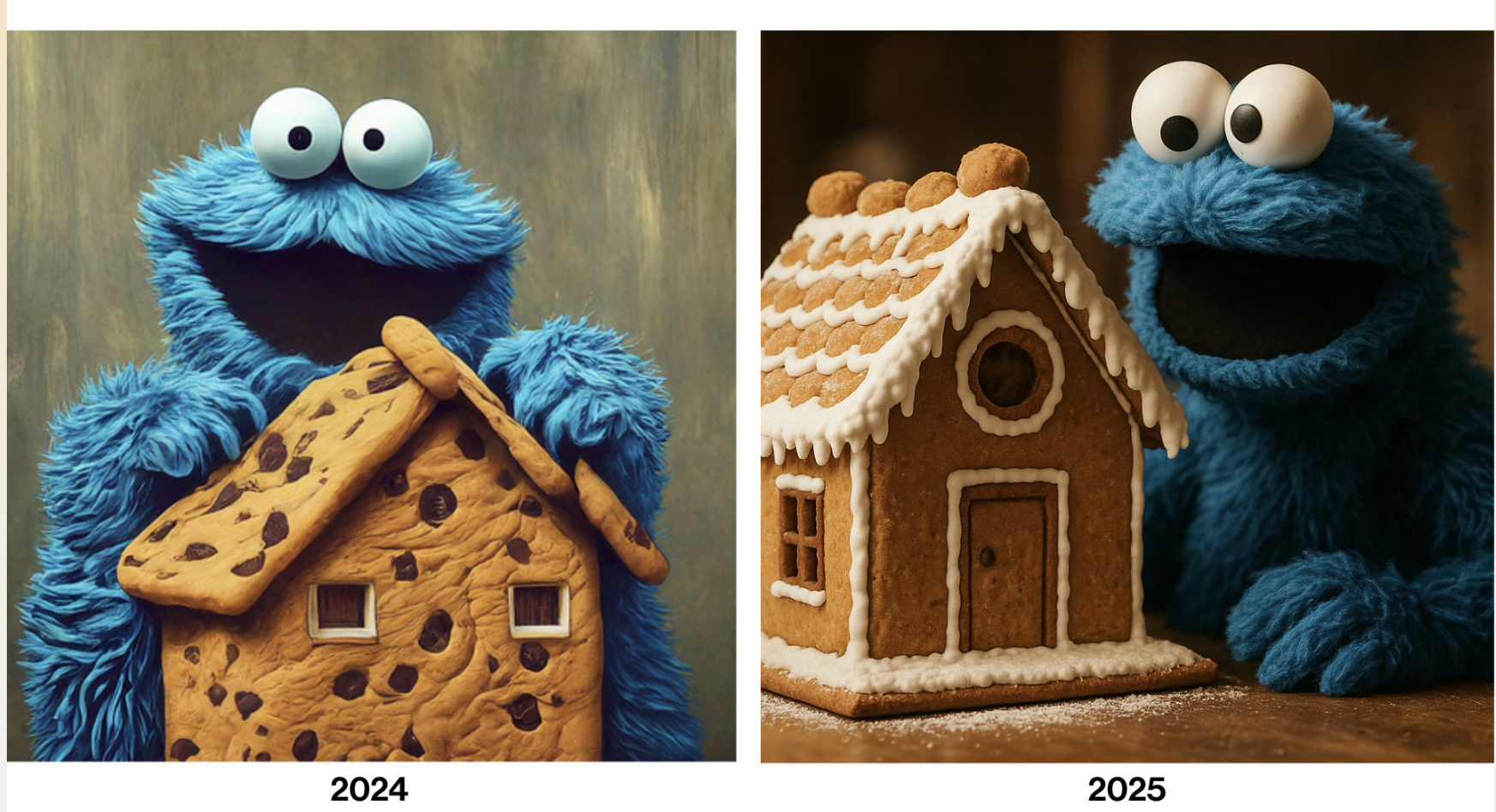
Image generation - policy
Code generation
- From fancy autocomplete to building entire apps
Multimodal
- Text to vision, audio, video
Context windows
- 4k tokens to 200k+ tokens
This course will teach you fundamentals that persist despite rapid change, and the skills to keep up with the changing landscape!
What this course is about
By the end of this course, you will:
- Understand how LLMs work (not just how to use them)
- Build transformers from scratch
- Apply LLMs to real problems (fine-tuning, prompting, RAG, agents)
- Think critically about bias, safety, and responsible deployment
- Build a professional portfolio of LLM projects
For detailed topics list and schedule, see our syllabus and the website.
Ethical Questions We'll Wrestle With
This technology raises questions we don't have answers to yet:
- Environmental impact - Training costs enormous energy
- Psychological safety - Reports of suicidality and psychosis in some users
- Bots and fakes - Proliferation of synthetic content
- Impact on learning - More classes are cancelling graded homework
- Artist and author rights - Unpaid labor used to train models
- Future of knowledge - What happens to deep expertise and persistence?
- The big questions - AI consciousness? Existential risk?
We won't solve these, but we'll think carefully about them throughout the semester.
Course Website Tour & Syllabus
Let's look at the course website
You're already here! Take a moment to explore:
- Syllabus
- Course Schedule
- Lecture notes (this page!)
What you'll find on the website
- Full syllabus with course policies
- Weekly schedule with due dates
- Lecture notes for every class
- Links to resources
Bookmark this page - it's your home base for the semester
How this course works
No traditional homework! Instead:
- Weekly reflections (200-500 words)
- Lab notebooks (hands-on experimentation)
- 2 portfolio pieces (polished projects)
- 2 midterm exams (theory, no AI)
- Final project (build something cool!)
All work goes in your GitHub portfolio - you'll have something to show employers!
Compute Resources
Towards the end of the course (and for your final project), you'll need more compute than your laptop can provide.
Recommended approach: Google Colab with education credits
Alternative: BU's Shared Computing Cluster (SCC)
If you find you need more compute than that, talk to us.
For first discussion (Tuesday): Try to have GitHub and a Colab account set up. Bhoomika can help troubleshoot any issues.
A note on how I teach
There will be times when I think I can explain something to you most effectively in person.
And there will be times when I think your best opportunity to learn comes from a YouTube video, a blog post, or other resources.
I'll be intentional about which is which. When I assign prework, it's because I genuinely think that's the best way for you to learn that material - not because I'm offloading teaching.
Key Course Policies
A few highlights before we dive into the full syllabus:
AI use for coding: Encouraged! Use it as much as you want. (Correspondingly: high expectations for project quality)
AI use for reflections: Please write in your own voice, no AI
Exams: No notes - just you and the concepts
Late work: 100% on time, 90% one day late, 80% two days late, exceptions are rare
Struggling? Reach out early! Extensions available, wellness matters
Syllabus Activity (20 min)
Time to dig into the details!
Instructions:
- Form groups of 2-3 people
- Grab a printed syllabus and worksheet
- Work together to answer the questions
- We'll reconvene in 15 minutes to discuss
Let's debrief
Essential Shell & Git Skills
What's your experience level with shell and git?
Drop hands polling
Why shell and git?
- Essential skills for developers and researchers that enable efficient iteration and collaboration
- Even MORE essential if you're handing the reins to AI development tools
- We'll use these throughout the course - your investment now will pay off later
Shell Basics: Navigation
The command line is your text-based interface to your computer
Essential commands:
pwd                   # Print working directory (where am I?)
ls                    # List files
ls -la                # List all files including hidden ones
cd folder_name        # Change directory
cd ..                 # Go up one level
cd ~                  # Go to home directory
If you're on windows, you can use git-bash for linux-compatible command line, or learn somewhat different commands for a shell like powershell
Tips:
- Use
Tabfor auto-completion - Use
Up Arrowto repeat previous commands Ctrl+Cto cancel/abort
Shell Basics: File Operations
mkdir project_name       # Create a directory
touch filename.txt       # Create an empty file
echo "text" > file.txt   # Write text to file
cat filename.txt         # Display file contents

cp file.txt backup.txt   # Copy a file
mv old.txt new.txt       # Rename/move a file
rm filename.txt          # Delete a file
For Lab 0, you'll mostly use:
cdto navigate to your projects foldermkdirto create your course repo foldergitcommands (next slide!)
Git & GitHub Essentials
Git = version control system (tracks changes to your code)
GitHub = hosting service for git repositories (plus collaboration tools)
You'll use GitHub Classroom for this course
Git Workflow for This Course
# One-time setup
git config --global user.name "Your Name"
git config --global user.email "your.email@bu.edu"

# For each lab/assignment
git clone [repo-url]           # Get the repo from GitHub
cd repo-name                   # Navigate into it

# Work on your code, then...
git add .                      # Stage all changes
git commit -m "Descriptive message"  # Save a snapshot
git push                       # Upload to GitHub
That's it! For this course, you mostly just need: clone, add, commit, push
Git Cheat Sheet
Common commands:
git status              # What's changed?
git add filename        # Stage specific file
git add .              # Stage everything
git commit -m "msg"    # Save a snapshot
git push               # Upload to GitHub
git pull               # Download from GitHub
git log                # See commit history
Good commit messages:
- "Add spam detection implementation"
- "Fix typo in reflection"
- "Complete Lab 1 embeddings exploration"
Pro tip: If you need to use "and" in your commit message, you're probably committing too many changes at once!
Resources for Shell & Git
- Git documentation
- GitHub's Git guides
- Interactive Git tutorial
- Ask in Piazza!
- Office hours
For Lab 0: You just need the basics - we'll practice more as the semester goes on
Challenge the AI!
Time to see what LLMs can (and can't) do
Let's put ChatGPT and Claude to the test!
Your mission: Come up with questions or tasks that might trip them up
A few starter ideas...
- Ask it to count the number of times the letter 'r' appears in "strawberry"
- Ask it about very recent events (knowledge cutoff!)
- Ask it to do complex multi-step reasoning
- Ask it something that requires true understanding vs pattern matching
- Try to get it to contradict itself
5 minutes: Pair up and try to stump the AI on your laptops
What did you find?
Why did these fail?
LLMs aren't perfect (yet)
LLMs are impressive but have clear limitations They're predicting patterns, not "thinking" (or are they?) Understanding their failures helps us use them responsibly.
This semester: we'll learn WHY they fail and how to work around it
Wrap-up
Before Friday (Lab 0 due)
- Complete the intro survey (linked on Piazza)
- Set up: GitHub account, Python environment, Jupyter notebooks
- Create your course GitHub repository (link to come)
- Write your first reflection (see website)
- Lab 0 (see website)
Coming up
Monday: AI-assisted development + Classical NLP introduction
- How to use AI coding tools effectively
- Bag-of-words and TF-IDF
- Start of Lab 1
See you Monday!
CDS593 Syllabus Review Worksheet
Group members:
Concrete questions:
-
How are weekly reflections and lab notebooks submitted?
-
What happens if you submit work a day late?
-
Is attendance in discussions required?
-
If you get stuck on an assignment and your friend explains how to do it, what should you do?
-
If you have accommodations for exams, how soon should you request them?
-
Is there a final exam for the course?
-
Can you use AI tools when working on portfolio pieces?
-
Can you use AI tools to help write your reflections?
Open-ended questions:
-
What parts of the course policies seem standard and what parts seem unique?
Standard: Unique:
-
Identify 2-3 things in the syllabus that concern you
-
What strategies could you use to address these concerns?
-
Identify 2-3 things on the syllabus that you're glad to see
-
List 2-3 questions you have about the course that aren't answered in the syllabus
-
What kind of engagement do you think you'll focus on for participation credit?